
ClickDesigns AI: Which Plans Include the AI Tools, and What They Cost
Disclosure: ReviewEpic earns a commission if you buy through links on this page, at no extra cost to you. We have not used ClickDesigns or its AI tools hands-on. This explainer is based on ClickDesigns’ own pages (the ClickBank sales page, clickdesigns.com/pricing, the AI Tools and Template Club offer pages, the ClickDesigns+ page) and its help centre, all checked on 12 Nov 2026. How we review · Affiliate disclosure
Short answer: ClickDesigns does have AI tools (an AI image creator, background remover, object remover, uncrop and more), but the one-time ClickDesigns Commercial edition sold through ClickBank does not include them. ClickDesigns’ help centre says so in plain words: “ClickDesigns Commercial does not come with AI”. You get AI through a monthly allowance on the subscription plans, or through paid add-ons.
Commercial is best for: sellers who want boxshots, ebook covers and device mockups for a one-time payment and don’t need AI.
Not for: anyone who wants AI image generation or background removal without a recurring bill.
Main limitation: every AI route ClickDesigns sells is metered by the month (100 to 1,000 uses), and unused uses don’t roll over.
Prices checked 12 Nov 2026: Commercial $67 on the sales page, $47 with the CD20OFF code it shows; AI Tools add-on $19 a month or $127 a year; subscriptions from $20 a month ($15 a month billed yearly).
See what the one-time ClickDesigns Commercial edition includes →
Google suggests “clickdesigns ai” and “clickdesigns plus” right under the brand name. The ClickDesigns site advertises “35+ A.I. tools”, and the $47 deal on ClickBank never mentions AI, so it’s easy to assume one comes with the other. We read the ClickBank sales page in full on 12 Nov 2026, and the words “AI” and “A.I.” don’t appear on it. Below is where the AI lives, what each route costs, and how the uses are counted. For the main rundown of the one-time edition, see our ClickDesigns overview.
Which ClickDesigns purchases include AI?
| What you buy | Price seen 12 Nov 2026 | AI included? | AI uses |
|---|---|---|---|
| ClickDesigns Commercial (ClickBank, one-time) | $67, or $47 with code CD20OFF (sales page) | No. Help centre article 80: “does not come with AI” | None |
| ClickDesigns AI Tools add-on (clickdesigns.com/ai) | $19/month or $127/year | Yes, AI only | 500 a month; “each output equals to 1 use” |
| Template Club (clickdesigns.com/plus/upgrade) | $47/month or $297/year | Yes, plus 14,000 templates | 500 a month, per help centre article 140 |
| ClickDesigns+ (clickdesigns.com/plus, one-time) | $397, shown as $297 with a “$100 off” coupon | An AI caption writer inside ClickSocials, per help article 66. The sales page lists no AI image tools | Not stated |
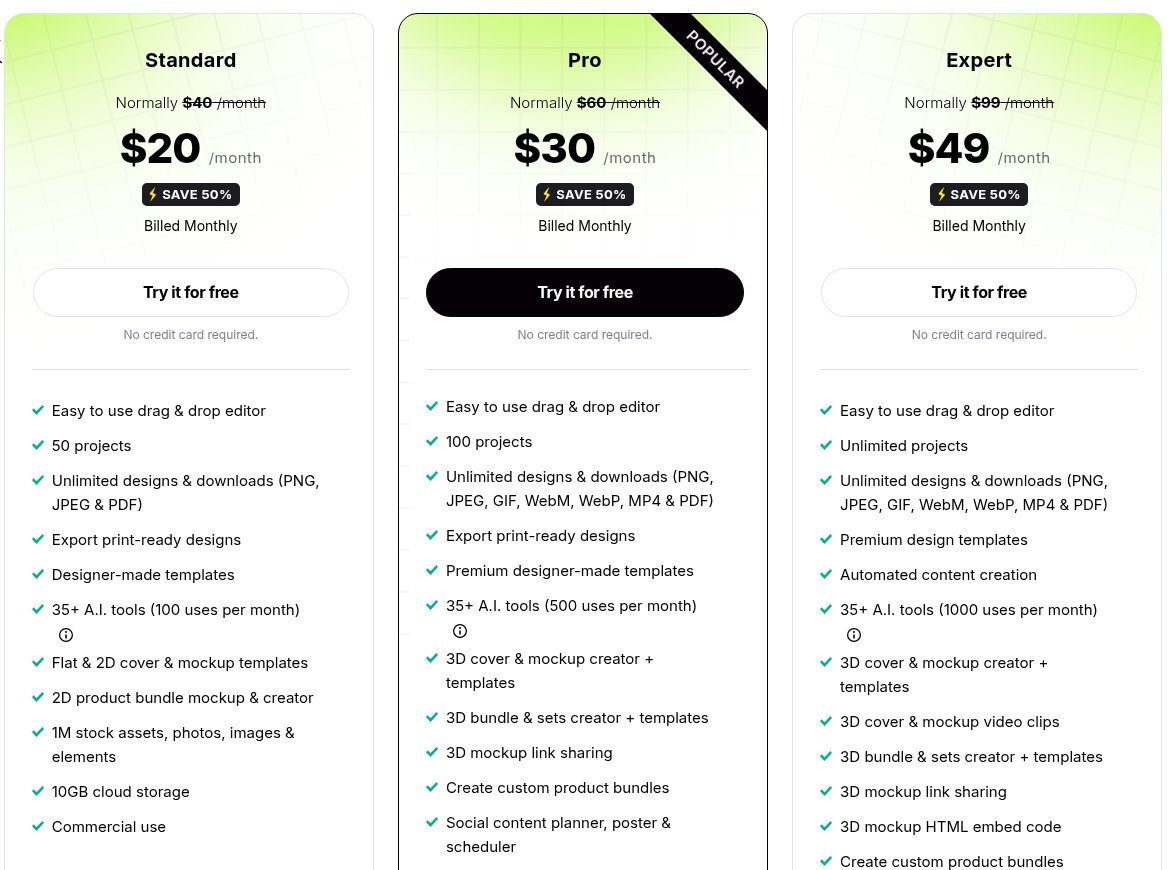
| Standard subscription | $20/month, or $15/month billed yearly ($180) | Yes | 100 a month |
| Pro subscription | $30/month, or $24/month billed yearly ($288) | Yes | 500 a month |
| Expert subscription | $49/month, or $42/month billed yearly ($504) | Yes | 1,000 a month |
The help centre is out of date on plan prices. articles 80 and 140 (last updated 16 Oct 2024) list a “Pro” plan at $24 a month with 1,000 AI uses, while the live pricing page shows Pro at $30 a month ($24 billed yearly) with 500 uses. We went with the pricing page. The AI Tools and Template Club pages are written as limited-time upsell offers with struck-through prices ($39 and $67 a month). Neither says whether you need an existing ClickDesigns account to buy, so ask support@clickdesigns.com before you pay if that matters to you.
What the ClickDesigns AI tools do
The AI Tools offer page lists these, with the last seven marked BETA:
- Image creation: A.I. Image Creator (text prompt to image).
- Cut-outs and clean-up: Background Removal, Object Removal, Face Cutout, Blur Background, Remove Text (beta).
- Photo fixes: Image Enhancer, Color Correction, LightFix (beta).
- Changing or extending an image: Toonize, Background Replacer, Image Expand, Reimagine, Uncrop, Text-Inpainting (all beta).
The same page also describes a Photo Colorizer and a 4x Image Upscaler higher up, which aren’t in its own checklist. The subscription pricing page counts “35+ A.I. tools” and its FAQ names an AI writer, background generator, find and replace, eraser, photo editor and generative fill. ClickDesigns doesn’t publish one master list, so the exact set you get may differ by plan.

According to help article 117, the image generator sits under an “Images AI” tab on the dashboard. You pick an AI model, write a prompt (there’s a negative-keywords box too), choose how many variations, a style such as Photographic or Cinematic, and an aspect ratio: square, wide or vertical. The article dates from March 2024, so the screen may look different now.
How ClickDesigns counts AI uses
The AI Tools page puts it as “no credit system, each output equals to 1 use”. The pricing page FAQ calls the same allowance credits: they are added to your account every month, “reset every month and do not rollover”. So 100 uses on Standard means 100 outputs a month, and whatever you don’t use is gone at the next reset.
What we couldn’t find on any ClickDesigns page:
- whether one image generation with four variations counts as one use or four;
- whether you can buy extra uses mid-month once you run out;
- whether the AI Tools add-on’s 500 uses reset the same way as the subscription credits (its page only says “Cancel anytime”).
If you plan to batch background removals for a store catalogue, those gaps decide whether 100 or 500 uses is enough. Ask support before choosing a tier. (We wrote up the same kind of question for another tool in how InstaDoodle AI credits work.)
Can you try ClickDesigns AI for free?
Partly. The pricing page FAQ says the free plan (no credit card) lets you explore the templates, mockups and “AI tools”, and you only pay when you want to download. So you can see what the AI does before paying, but you can’t export the results on the free plan. The ClickBank edition has no trial; it has a 30-day refund, which the sales page says you claim by emailing support.
Adding AI to the one-time ClickDesigns Commercial edition
If you buy Commercial for the 3D boxshots and covers and later want AI, these are the year-one totals based on the prices above:
| Route | Year-one cost | AI uses a month | What else you get |
|---|---|---|---|
| Commercial only | $47 (with CD20OFF) | 0 | One-time editor for logos, boxshots, covers, reports, device mockups |
| Commercial + AI Tools yearly | $47 + $127 = $174 | 500 | AI editor only |
| Commercial + Template Club yearly | $47 + $297 = $344 | 500 | 14,000 templates plus 200 new ones a month |
| Standard yearly, no Commercial | $180 | 100 | Flat and 2D mockups only; 3D creator starts at Pro |
| Pro yearly, no Commercial | $288 | 500 | 3D cover, mockup and bundle creator; social planner |
Note on Template Club: ClickDesigns help centre article 140 says it adds 300 new templates a month, while the live Template Club offer page says 200+ a month (both checked 12 Nov 2026). This page follows the live offer page.
For 3D boxshots plus 500 AI uses, Commercial + AI Tools ($174) comes in below Pro yearly ($288) on paper, but you would be running two separate products, and the one-time editor has fewer templates than the subscriptions. Pro keeps everything in one account. The full price breakdown of the one-time deal is in our ClickDesigns lifetime deal post.

Check the current ClickDesigns Commercial price and refund terms →
What is ClickDesigns+ (ClickDesigns Plus)?
ClickDesigns+ is a separate one-time package of eight template apps: ClickSocials (social templates, calendar and scheduler), ClickPackaging, ClickApparels, ClickPages, Covers 2.0, ClickPrints, ClickInfographics and ClickPublishing (KDP book covers). Its sales page shows $397, cut to $297 with a “$100 off” coupon it says ends at midnight, and a 30-day money-back guarantee. Help article 80 calls ClickDesigns+ “an upgrade plus A.I.”, and help article 66 says it comes with a Social AI Writer for captions inside ClickSocials. Its sales page doesn’t list the image AI tools above, so don’t buy it expecting the AI image editor.
The clickdesigns.com homepage now sells ClickDesigns X, a newer one-time product sold through JVZoo with its own upgrades. This page and our links cover the ClickBank Commercial edition only. Our ClickDesigns vs Canva comparison also touches on X.
Which route fits you?
| If you… | Look at |
|---|---|
| Need ebook covers, boxshots and device mockups and no AI | Commercial, one-time |
| Already own Commercial and want background removal or AI images | AI Tools add-on (ask support first whether it attaches to your account) |
| Want AI and 3D mockups in one account | Pro subscription |
| Need more than 500 AI outputs a month | Expert (1,000 uses) |
| Want to see the AI before paying | Free plan on clickdesigns.com (no downloads) |
FAQ
Does the $47 ClickDesigns lifetime deal include AI?
No. ClickDesigns’ help article 80 says the Commercial edition “does not come with AI, ClickDesigns+, and the rest of the ClickDesigns Suite features”, and the ClickBank sales page doesn’t mention AI.
Do unused ClickDesigns AI uses roll over?
Not on the subscriptions. The pricing FAQ says credits reset every month and do not roll over. The AI Tools add-on page doesn’t say either way.
Is ClickDesigns AI a separate app?
It runs inside ClickDesigns. Help article 117 shows it under an “Images AI” tab on the dashboard, and the AI Tools offer calls it the “New Generation ClickDesigns A.I. Editor”.
Can I cancel the AI add-on?
Both AI Tools options say “Cancel anytime”. The subscriptions can be cancelled under Profile > Subscription, per the pricing FAQ.
Bottom line
Buy ClickDesigns Commercial for one-time boxshots, covers and mockups, and treat AI as a separate monthly cost if you want it later: $127 a year for the AI Tools add-on, or a subscription from $180 a year. If AI images or background removal are the main reason you’re looking, start on the free plan and test them before paying for anything.
View the ClickDesigns Commercial offer on the official site →
Related: ClickDesigns overview · ClickDesigns lifetime deal · ClickDesigns vs Canva · InstaDoodle AI credits