Vertex42 Gantt Chart Pro: Who It’s For (Free vs Pro, 2026)
Disclosure: ReviewEpic earns a commission if you buy through links on this page, at no extra cost to you. We have not tested Vertex42 Gantt Chart Pro hands-on. This overview is based on Vertex42’s Gantt Chart Pro sales page, its free Gantt chart page and its project-management template pages, checked on 26 October 2026. How we review · Affiliate disclosure
Short answer: Gantt Chart Pro is for people who already plan projects in Excel or Google Sheets and have outgrown Vertex42’s free Gantt chart, usually because they need task dependencies, work-day scheduling with holidays, or milestone and overdue tracking. If your schedule is a simple list of start dates and durations, the free template probably covers it.
- Good fit: solo project leads, small teams and contractors who share schedules as spreadsheet files.
- Poor fit: teams that need several people editing live, automatic notifications, or many linked projects.
- Price: $35.00 one-time, sold through ClickBank (checked 26 Oct 2026). Vertex42 says updates are free and there is no subscription.
- Refund: the sales page says you have 60 days to request a refund.
- Tested on: not tested hands-on. This is an overview.
Why this post
Our Vertex42 overview covered the whole template library. This post narrows it to one buying question: should you pay $35 for Gantt Chart Pro, or is Vertex42’s free Gantt chart enough for the way you work? The answer depends less on the product than on the kind of projects you run, so we’ve organised it by situation.
Contents: Free vs Pro · Who it’s for · Who should skip it · Who gets value from the bonus files · Before you buy · FAQ
What the free version does, and what Pro adds
Vertex42’s free Gantt Chart Template is a plain spreadsheet with no macros. According to its page, each row is a task, you enter a start date and a duration, a scroll bar moves the date range, a % Complete column fills the bars, a red line marks today, and you copy a formula from the bottom of the sheet to number tasks in a work breakdown structure (WBS). It comes as an Excel 2010+ file and a Google Sheets version, with older OpenOffice and Excel 2003 files also listed.

The free page also shows how to build dependencies yourself with formulas such as =WORKDAY(end_date,1), and says Pro is “designed to make this easier than entering your own formulas”. Based on the Pro sales page (version 5.0, updated 12 March 2025), here is what the paid file adds:
| Need | Free Gantt chart | Gantt Chart Pro (vendor description) |
|---|---|---|
| Task durations | Start date + duration | Work days, calendar days or an end date |
| Holidays and weekends | Not built in (you’d write WORKDAY formulas) | Holidays worksheet and a custom weekend setting |
| Dependencies | Your own formulas | Predecessor column, up to 3 predecessors per task, optional lead/lag column |
| Views | Scroll bar over a date range | Daily, weekly, monthly and quarterly; sequential or ISO week numbers |
| WBS numbering | Copy a formula per level | Automatic from a level number (1–4), with automatic indenting in Excel |
| Tracking | % Complete | % Done bars, Priority column, overdue highlighting, milestone diamonds, optional planned-vs-actual columns |
| Bar colours | Single style | Colour codes per task |
| Price | Free | $35.00 one-time |
Who Gantt Chart Pro is for
Use this as a checklist. If two or more of these describe you, Pro is worth a closer look. If none do, start with the free file.
- You schedule in work days, not calendar days. If “this task takes 5 working days and skips the public holiday” is how you think, Pro’s work-day durations, holiday list and custom weekend setting do that without you writing WORKDAY.INTL formulas. This matters if your team doesn’t work Saturday–Sunday weekends.
- Your tasks depend on each other. If moving one task should push the next ones, Pro’s predecessor column (up to three per task, plus lead or lag days) is the main reason to upgrade. The free version leaves this to your own formulas.
- You report progress to someone else. Project leads who send a schedule to a client or manager get milestone diamonds, overdue highlighting, a priority column and an optional planned-vs-actual view, which the free file doesn’t have.
- You’re a contractor or small team sharing a file, not a login. Vertex42 says one purchase covers “your entire team, not just a single computer or user”, so a small office can use one copy. You still email or share the file, since it isn’t collaborative software.
- You’re comfortable in Excel. The sales page says colour rules can need “advanced knowledge of Excel” to change, and summary-task dates and % complete use formulas you enter yourself, such as MIN, MAX or MINIFS. You don’t need to be an expert, but you should be happy editing formulas.
- You avoid subscriptions. It’s a one-time $35 with free updates, according to Vertex42, compared with per-user monthly pricing for most project-management apps.
If that list sounds like your week, check the current Gantt Chart Pro price and requirements on Vertex42’s site. Otherwise, keep reading for who should skip it.
Who should skip it
- Simple, one-off schedules. If you only need bars for a handful of tasks with start dates, the free Vertex42 Gantt chart already does that.
- Teams that need live collaboration. Pro is a file. There are no notifications, comments or multi-user editing beyond what Excel Online or Google Sheets give you. Vertex42’s own project-management page says that anything more complicated than its Gantt chart “would probably require Microsoft Project or other project management software”.
- Mostly-Google-Sheets users who want every feature. The Excel file isn’t fully compatible with Google Sheets. A separate Sheets version is included, but the sales page notes that automatic indenting and colour codes 1–6 don’t work there.
- Non-English Excel installs. The purchase box lists “Excel 2010 or later, English language settings” as a requirement.
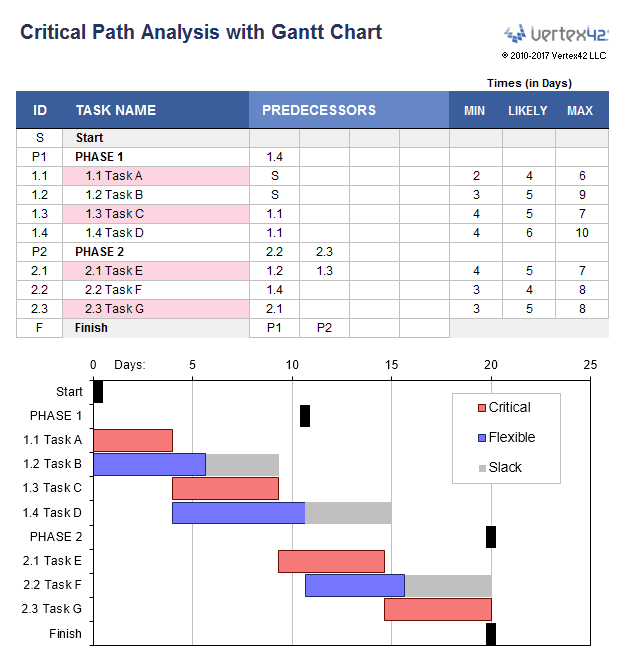
- People who want critical-path analysis inside the main chart. Vertex42 says its only template that calculates critical tasks and float is the separate CPM spreadsheet. That file comes as a bonus with Pro, but it’s a separate workbook.
- Anyone planning to resell templates. The licence is “Private Use”.
Who gets value from the bonus files
Vertex42 lists five bonus files with the purchase. Each is a separate file, and the sales page says there’s no automatic way to move information between them. They come from Vertex42, not from ReviewEpic.
- Advanced version with Resource Availability (beta). For managers who assign people to tasks and want to see who is overloaded. It needs Excel 2019 or later and supports one resource per task, according to Vertex42, which describes it as “admittedly more complex”.
- Excel Timeline Template (listed at $19.95 on its own). For people who present high-level timelines rather than detailed task lists.
- Time-Based Gantt Chart. For processes measured in minutes or hours over a 24-hour schedule, such as an event run-sheet. It doesn’t handle weekends or holidays.
- Critical Path Method (CPM) spreadsheet, Pro version (listed at $14.95 on its own). For people who need to know which tasks have no slack.
- Files from the “How to Make a Gantt Chart in Excel” video series. For people learning to build their own charts.

Before you buy: a quick fit check
- Download the free Gantt chart first and build your real project in it. Vertex42 says Pro v5.0 looks very similar, so you’ll see whether the layout suits you.
- Note what you had to work around. If it was dependencies, holidays or progress reporting, those are the gaps Pro is described as filling.
- Check your setup: Excel 2010 or later with English language settings, or Google Sheets with the limits above. The advanced resource version needs Excel 2019 or later.
- Know the habit Pro needs. The sales page says to always copy an entire row down after inserting rows so the formulas carry over.
- Know the refund route. The sales page gives a 60-day refund window, and purchases go through ClickBank.
Prices and terms can change, so confirm them on the official page on the day you buy.
Check Gantt Chart Pro pricing and refund terms →
FAQ
Is the free Vertex42 Gantt chart enough for most people?
For simple schedules, very possibly. It handles start dates, durations, % complete, a today line and WBS numbering. Pro mainly adds dependencies, work-day scheduling with holidays, more views and tracking features. We haven’t tested either file, so try the free one with your own project first.
Can a whole team use one copy of Gantt Chart Pro?
Vertex42’s sales page says a purchase is “for your entire team, not just a single computer or user”, under a Private Use licence. That covers who may use it, not live collaboration. Sharing still happens through the file, Excel Online or Google Sheets.
Does Gantt Chart Pro work in Google Sheets?
A separate Google Sheets version is included with the purchase. The Excel file itself isn’t fully compatible with Sheets, and the vendor notes automatic indenting and colour codes 1–6 aren’t available in the Sheets version. There’s also no scroll bar in Excel Online or Sheets.
Is it a one-time payment?
Yes, according to Vertex42. The page listed $35.00 on 26 October 2026, with “no subscription fee” and free updates downloaded from the same page.
What’s the refund policy?
The sales page says you have 60 days to request a refund if Gantt Chart Pro isn’t for you. Orders are processed by ClickBank. Check the terms shown at checkout before you pay.
Bottom line
Gantt Chart Pro makes sense for Excel-comfortable project leads, contractors and small teams whose schedules have dependencies, holidays or progress reports, and who would rather pay once than subscribe. If your projects are short and simple, the free template is the honest first step, and if you need real-time teamwork, look at dedicated project software instead.
Get Vertex42 Gantt Chart Pro from the official site →
Prefer something else? See the alternatives in our Vertex42 overview ↑
Last updated: 26 October 2026. Not tested hands-on. Price, requirements and refund terms checked 26 October 2026 on vertex42.com.
More on Vertex42: Vertex42 overview: free templates and Gantt Chart Pro
Related: Clozure AI Business OS overview · LocalTry overview